






أحدث اصدار
إصدار
1.0
1.0
تاريخ الاصدار
يوليو 23, 2023
يوليو 23, 2023
مطور
HEER creation
HEER creation
فئات
Tools
Tools
المنصات
Android
Android
التحميلات
0
0
السعر
Free
Free
الإبلاغ عن مشكلة
الإبلاغ عن مشكلة
الإبلاغ عن مشكلة
المزيد عن Video Downloader For Threadslication
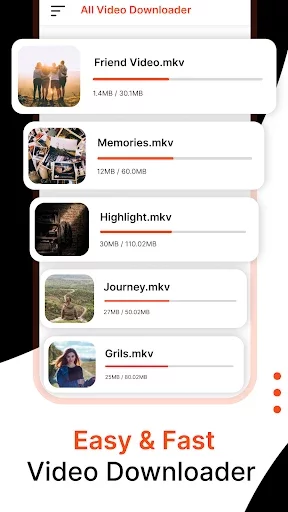
Thread Video Downloader is a powerful app that allows you to effortlessly download videos from the popular Threads. Save your favorite videos to your device and enjoy them anytime, anywhere. With its intuitive interface and seamless integration, Thread Video Downloader is the ultimate solution for video enthusiasts. You can share downloaded videos with any other social media platform.
📥 Download Videos Seamlessly
Threads Video Downloader offers a hassle-free solution to download videos from the popular Threads app. Simply copy the video link within Threads and paste it into our app, and voila! The video will be downloaded and saved to your device, ready to be viewed offline or shared with friends.
🏆 How to save Threads video :
Method A: No need to login
1. Click “Share” icon of the video you like;
2. Click the copy link button
3. Open the Donloader for Threads app and click download
Key features:
Download videos: thread downloader enables you to save videos shared on threads with just a few taps. Preserve memorable moments, entertaining clips, or informative videos from threads and access them offline anytime.
Save images: with thread downloader, you can quickly and conveniently download images posted on threads. Whether it's captivating photographs, inspiring quotes, or eye-catching visuals, thread downloader ensures you can keep them in your personal collection.
Multi-image downloads: thread downloader supports the saving of multi-images, allowing you to effortlessly download and store entire image galleries shared on threads. Don't miss out on any of the moments captured in multi-image posts.
User-friendly interface: our app is designed to be intuitive and user-friendly, making it accessible for users of all experience levels. Seamlessly navigate through threads and easily download the content you desire.
Fast and reliable downloads: thread downloader offers speedy and reliable download functionality, ensuring that you can quickly save your desired content from threads without any interruptions.
Share with ease: thread downloader enables you to share your saved videos, images, and multi-images directly from the app. Share captivating content with friends, family, or on your favorite social media platforms.
One-click shortcut: The threads video downloader app offers a highly useful feature where you can easily download videos from threads through the share button. Once you click on the share button in the threads app, a popup will appear. From there, simply select the threads downloader app, and presto! Your video or image will start downloading.
Download history: This app also provides a download history feature, allowing you to conveniently access all your downloaded files in threads. You can easily navigate between them, view them as images, or play them as videos.
Moreover, the media downloader for the threads app now supports videos as well as gifs. That's right! You can effortlessly download any video, image, or even gif from Threads with ease.
With just a few clicks, you can easily download your favorite images or videos from Threads. Here's a step-by-step guide on how to use the app:
- Open the Threads app.
- Search for the video or image you want to download.
- Tap on the share button.
- Select the thread downloader app from the list of apps, or you can copy the link and follow the steps below.
- Now, open the thread downloader app and paste the copied link into the designated field.
- Click on the download button, and voila! Your video or image will be saved in your gallery.
Note: Video Downloader For Threads app that provides loan-related guidance and does not directly offer loans or financial services. It is recommended to consult with financial experts for personalized advice
Threads Video Downloader offers a hassle-free solution to download videos from the popular Threads app. Simply copy the video link within Threads and paste it into our app, and voila! The video will be downloaded and saved to your device, ready to be viewed offline or shared with friends.
🏆 How to save Threads video :
Method A: No need to login
1. Click “Share” icon of the video you like;
2. Click the copy link button
3. Open the Donloader for Threads app and click download
Key features:
Download videos: thread downloader enables you to save videos shared on threads with just a few taps. Preserve memorable moments, entertaining clips, or informative videos from threads and access them offline anytime.
Save images: with thread downloader, you can quickly and conveniently download images posted on threads. Whether it's captivating photographs, inspiring quotes, or eye-catching visuals, thread downloader ensures you can keep them in your personal collection.
Multi-image downloads: thread downloader supports the saving of multi-images, allowing you to effortlessly download and store entire image galleries shared on threads. Don't miss out on any of the moments captured in multi-image posts.
User-friendly interface: our app is designed to be intuitive and user-friendly, making it accessible for users of all experience levels. Seamlessly navigate through threads and easily download the content you desire.
Fast and reliable downloads: thread downloader offers speedy and reliable download functionality, ensuring that you can quickly save your desired content from threads without any interruptions.
Share with ease: thread downloader enables you to share your saved videos, images, and multi-images directly from the app. Share captivating content with friends, family, or on your favorite social media platforms.
One-click shortcut: The threads video downloader app offers a highly useful feature where you can easily download videos from threads through the share button. Once you click on the share button in the threads app, a popup will appear. From there, simply select the threads downloader app, and presto! Your video or image will start downloading.
Download history: This app also provides a download history feature, allowing you to conveniently access all your downloaded files in threads. You can easily navigate between them, view them as images, or play them as videos.
Moreover, the media downloader for the threads app now supports videos as well as gifs. That's right! You can effortlessly download any video, image, or even gif from Threads with ease.
With just a few clicks, you can easily download your favorite images or videos from Threads. Here's a step-by-step guide on how to use the app:
- Open the Threads app.
- Search for the video or image you want to download.
- Tap on the share button.
- Select the thread downloader app from the list of apps, or you can copy the link and follow the steps below.
- Now, open the thread downloader app and paste the copied link into the designated field.
- Click on the download button, and voila! Your video or image will be saved in your gallery.
Note: Video Downloader For Threads app that provides loan-related guidance and does not directly offer loans or financial services. It is recommended to consult with financial experts for personalized advice
قيم التطبيق
أضف تعليقًا ومراجعة
مراجعات المستخدمين
Based on 0 reviews
لم تتم إضافة أي تعليقات حتى الآن.
لن تتم الموافقة على نشر التعليقات إذا كانت رسائل غير مرغوب فيها أو مسيئة أو خارج الموضوع أو تستخدم لغة بذيئة أو تحتوي على هجوم شخصي أو تروج للكراهية من أي نوع.
المزيد »

تطبيقات رائجة

مترجم كل اللغات - مترجم صوتيOffice Tools- PDF Document Reader_Music Player MP3

Twitter - التويترX Corp.

واتساب مسنجرWhatsApp LLC
Emojikey: ايموجي كيبورد ,GIFPhoto - Picture keyboard

Google ChromeGoogle LLC

Tevegram: Telegram for TVnot.a.bug

MessengerMeta Platforms, Inc.

TelegramTelegram FZ-LLC

Stars Messenger Kids Safe ChatConnect Works

Threads, an Instagram appInstagram